// guide
Mercury cash flow forecast for Shopify brands with Keel HQ
Connect Mercury to Keel HQ with a read-only API token. Every active account syncs nightly or on demand into opening cash, runway and a 14-week forecast.

David LindahlFounder of Keel HQ, and runs a DTC brand on it
Published Last verified
- Access
- Read-only API token; it can't move money
- Sync
- Nightly, plus on demand
- Forecast
- 14 weeks from your balances
// the steps
- 01Create a read-only Mercury API token. In Mercury, open All Settings, then Tokens, and create a Read Only token. It can read account data but can't move money.
- 02Paste it into Keel HQ. In Keel HQ, open Settings, then Integrations, find the Mercury card, paste the key and click Save and Sync Now.
- 03Choose which accounts count. In Cash, then Settings, switch on the accounts the forecast should start from, and leave out money set aside for taxes or reserves.
- 04Read the forecast. Open Cash, then Forecast, for opening cash and the weeks that fall below your minimum. Runway is on the Cash overview.
// tl;dr
Keel HQ pulls every active Mercury account into your cash forecast: balances and transactions, nightly and whenever you press Sync Accounts. Those balances become the forecast's opening cash and drive your runway, alongside Shopify payouts, bills and purchase order payments over 14 weeks. Other banks work through statement import or manual balances.
Mercury is the one bank Keel HQ connects to directly. Once the connection is on, you don't type balances into a spreadsheet: they arrive on their own, and the cash forecast starts from them.
What syncs
Every active account's balance. A row per account in Cash → Settings, with its as-of time. Checking and savings are labelled.
Recent transactions. Stored per account. When you mark a cash action as done, Keel HQ can search Mercury for the matching transaction (Cash → Settings → Transaction Matching).
Sync schedule. Nightly for every connected organization, plus Sync Accounts on demand.
From those balances Keel HQ builds:
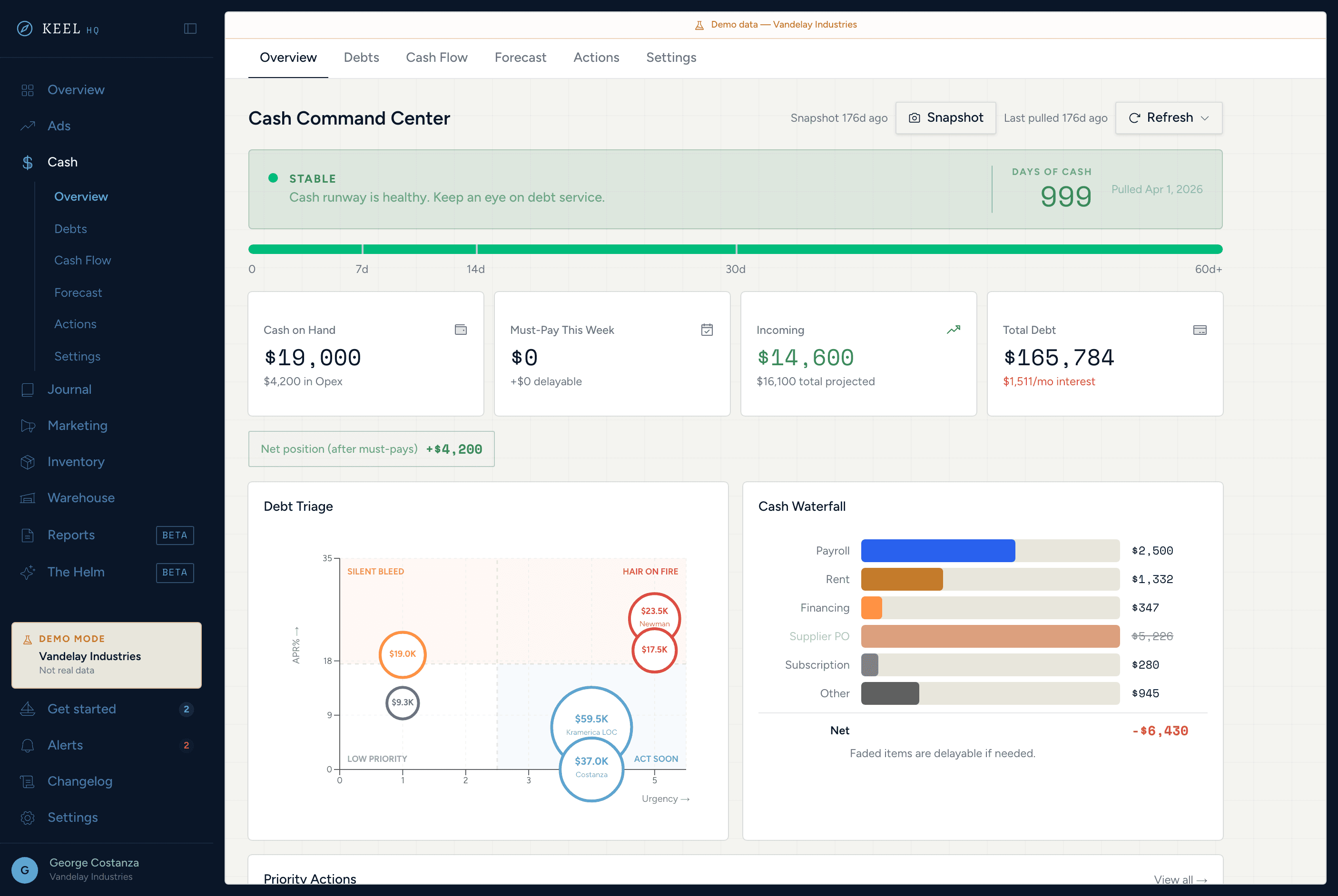
Opening cash above the forecast: the sum of the accounts you switched on, with the time it was true and a warning when it's more than 48 hours old.
Runway on the Cash overview: your operating cash divided by a weekly burn built from bills and debts.
A 14-week forecast with Shopify payouts (including the payout lag), recurring bills, debts, supplier purchase order payments, and a minimum-cash line. Weeks that end below the minimum are flagged.
Connect Mercury
- 01Create a token in Mercury
Click your organization at the top left, choose All Settings, open Tokens, and click Create an API Token. Pick Read Only: per Mercury's API documentation (accessed 2026-10-24) it fetches account data, can't initiate transactions or manage recipients, and needs no IP allowlist. If you don't see the option, ask an account admin.
- 02Add it to Keel HQ
Open Settings → Integrations, find the Mercury card, and paste the key into API Key.
- 03Click Save and Sync Now
The first pull imports your accounts, and a toast reports how many synced. Test Connection checks the key later without syncing.
- 04Pick the accounts that count
In Cash → Settings, switch on the accounts the forecast starts from. Leave out money you've set aside for taxes, profit or reserves.
- 05Open Cash → Forecast
The line above the table shows the opening cash, when it was true, and which accounts it came from. Runway is on the Cash overview.
You need the member role or above to save the key. A viewer can look but not connect.
When something looks wrong
"Last synced" is old. Click Sync Accounts. If it fails, the card shows the error. If Mercury rejected the key, create a new token, paste it into API Key and save.
A warning about transactions. The accounts did sync, but one account's transactions failed to pull. Balances, and so the forecast, are still current.
No active accounts. Mercury reported no active accounts, so Keel HQ has no balances to import.
Mercury or statement import?
Use Mercury sync when your operating cash is in Mercury. It refreshes every night without anyone typing a balance.
Use statement import for any other bank: in Cash → Settings, click Import statement and upload an OFX, QFX or CSV file. An import can update the account's balance, dated to the statement, unless the account already has a newer one. If your bank doesn't offer a file you can use, add a manual balance with an as-of date and keep Balance Reminders on in Cash → Settings for the Monday reminder to refresh it.
You can mix them: Mercury for operating cash, a manual or imported balance for a second bank. The forecast sums whichever accounts you switched on.
What this doesn't do
No bank feeds besides Mercury (no Plaid, and no QuickBooks or Xero sync).
No payments or transfers: it's read-only.
No statistical cash forecast. The forecast is your balances plus the payouts, bills and purchase orders you've entered or synced.
Keel HQ is in private beta, with a waitlist.
If you buy inventory, add your suppliers and purchase orders next so deposits and balances show up as forecast weeks. The inventory features explain how.
Questions
- Does Keel HQ move money in my Mercury account?
- No. Keel HQ only reads balances and transactions. Create a Read Only token in Mercury, which Mercury documents as unable to initiate transactions or manage recipients.
- How often does Mercury sync?
- Nightly for every organization with a connected Mercury key, and on demand when you click Sync Accounts in Settings, then Integrations.
- Does it sync all my Mercury accounts?
- Every active account. Closed or archived accounts are skipped and removed from Keel HQ. Savings accounts are labelled as savings, and you choose which accounts count toward the forecast.
- Is the forecast 13 weeks?
- Keel HQ's forecast runs 14 weeks, so it covers a full quarter plus a week of margin.
- What if my bank isn't Mercury?
- Import a statement as OFX, QFX or CSV from Cash, then Settings, or add a manual balance with an as-of date. Keel HQ has no other bank feeds yet.
// how keel hq does this
Know your position. Never be surprised.
Runway days, debt stack, a 14-week rolling forecast with scenario sliders, and auto-generated action items — all without a spreadsheet.
See cash command center in Keel HQ
// sources
- Getting started with your API, Mercury API documentation · accessed