// guide
How to build a 13-week cash flow forecast for a Shopify brand
Build a 13-week cash flow forecast from Shopify sales: payout lag, fees, supplier PO deposits, ad spend and a minimum cash line, with a worked example.

David LindahlFounder of Keel HQ, and runs a DTC brand on it
Published Last verified
// the steps
- 01Start from today's cash. Add up the accounts you can spend from and leave out money set aside for taxes or reserves.
- 02Turn sales into cash. Take weekly sales, subtract the processor fee and refunds, and move the cash to the days the payout reaches your bank.
- 03Add the payouts already in transit. Payouts Shopify has already scheduled land on their dates and are not part of the sales you still have to make.
- 04Enter fixed costs, payroll and debt service. Put each bill in the week it is paid, not the month it belongs to.
- 05Enter supplier payments. Put each purchase order deposit and balance in the week it is due.
- 06Enter ad spend and other outflows. Use the current weekly run rate for ads, and add one-off items such as sales tax.
- 07Roll the balance forward. Ending cash is opening cash plus cash in minus cash out. Next week opens where this one ends.
- 08Flag the weeks below your minimum. Mark every week that ends under the cash you need to keep, and move a payment or a purchase order until none does.
// tl;dr
A 13-week cash flow forecast lists, week by week, the cash that will land in your bank and the cash that will leave it, starting from today's balance. For a Shopify brand the detail that matters is timing: sales reach the bank days later, net of fees and refunds, while supplier deposits and payroll leave on fixed dates. Build it in 13 rows, then flag the weeks that end below your minimum cash.
A 13-week cash flow forecast answers one question: in which week will I run short of cash, and by how much? For a Shopify brand the answer depends on timing more than on profit. Customers pay today, the payout reaches your bank days later, and a supplier deposit leaves on a date you agreed months ago.
This guide builds the forecast row by row. The free template has every row already wired, and the worked example uses Vandelay Industries, Keel HQ's demo company.
What you need
| Input | Where to find it |
|---|---|
| Opening cash | Your bank balances today, for the accounts you can spend from |
| Weekly sales | Shopify sales for the last 4 to 8 weeks, adjusted for the season |
| Processor fee and refund rate | Your Shopify payouts and returns, as a share of sales |
| Payout lag | The gap between a sale and the payout reaching your bank |
| Payouts in transit | The payouts Shopify has already scheduled |
| Bills, payroll and debt payments | Your due dates |
| Purchase orders | Each supplier's deposit and balance dates |
| Ad spend | Your current weekly run rate |
| Minimum cash | The balance you won't let a week end below |
Step 1: Start from today's cash
Add up the accounts you can spend from. Leave out money set aside for sales tax, profit or reserves, or the forecast will say you're safe when you aren't. This is week 1's opening cash.
opening cash, week 1 = spendable bank balances today
Step 2: Turn sales into cash
Sales are not cash. Two things stand between them:
- Fees and refunds. The processor takes a share of what customers paid, and refunds give some back.
- The payout lag. Shopify says payout schedules use business days only, that the United States has a 3 business day minimum settlement time, and that payments captured Friday, Saturday and Sunday are grouped into one payout. Your bank may then take 1 to 3 more days to show the funds (Shopify Help Center, accessed 2026-10-24).
cash from sales = sales × (1 − fee rate − refund rate)
In a weekly grid, some of this week's sales land next week. If sales are spread evenly over seven days and the lag is L business days (1 to 5), the share that lands the following week is (L + 2) ÷ 7. With a 3-day lag that is 5 ÷ 7, about 71%.
cash this week = cash-adjusted sales × (1 − share) + last week's cash-adjusted sales × share
Week 1 is different. Sales made before today are already in your balance or in a payout Shopify has scheduled, so week 1 only counts the sales from today on (step 3). Each remaining day's cash lands the lag later in business days, and a weekend sale lands the next week, so the share of week 1's remaining sales that is paid out next week depends on the day you start:
share paid out next week = 1 − max(0, 5 − lag − d) ÷ (7 − d), where d is 0 for Monday up to 6 for Sunday
Starting on a Monday with a 3-day lag that is 5 ÷ 7, the same as every other week. Starting on a Friday with a 3-day lag it is 100%: none of the remaining sales reach the bank this week. The template does this from an "As of" date.
Step 3: Add the payouts already in transit
Shopify shows the payouts it has scheduled. Enter each in the week it lands. Don't also count the sales behind them: those are in the row above for week 1 only if they happen from today on.
Step 4: Fixed costs, payroll and debt service
Put each payment in the week it is paid, not the month it belongs to. Rent on the 1st lands in the week containing the 1st. Payroll every other Friday lands in every second week. Loan and card payments go in their due week, and a credit card you pay in full each month is a bill, not a rounding error.
Step 5: Supplier payments
This is the row that breaks most Shopify brands' forecasts. A purchase order is not one payment: it is a deposit when you place it and a balance before or after the goods ship, often weeks apart. Enter each as its own amount in its own week. If you reorder before the balance of the last order is paid, both appear in the same week.
Step 6: Ad spend and other outflows
Use this week's ad spend run rate for the weeks ahead, and add one-offs: quarterly sales tax, annual insurance, an inventory count. If you plan to cut ads in a slow week, change the row, not the total.
Step 7: Roll the balance forward
net cash flow = cash from sales + scheduled payouts − fixed costs − payroll − debt service − supplier payments − ad spend − other outflows
ending cash = opening cash + net cash flow
Each week opens where the last one ended.
Step 8: Flag the weeks below your minimum
Choose a minimum cash balance, for example two payrolls plus the next supplier payment, and flag every week that ends below it. The flagged week is the one to fix: move a supplier balance, ask for different terms, or time a purchase order after the busy week's cash lands.
Worked example: Vandelay Industries
Vandelay Industries starts the quarter on Monday 2026-10-26 with 50,000 in the bank and a 45,000 minimum. It pays fees of 3%, refunds of 4% of sales, and its payouts take 3 business days. Sales climb into Black Friday week. It has a 14,200 payout already scheduled for week 1, payroll every other week, rent and software on the first of the month, three loan payments and a run of purchase order deposits and balances. All figures are sample data.
| Week of | Sales | Cash from sales | Payouts | Cash out | Net | Ending cash |
|---|---|---|---|---|---|---|
| 2026-10-26 | 31,000 | 8,237 | 14,200 | 16,000 | 6,437 | 56,437 |
| 2026-11-02 | 33,000 | 29,361 | 0 | 34,800 | -5,439 | 50,999 |
| 2026-11-09 | 34,000 | 30,956 | 0 | 37,700 | -6,744 | 44,254 (below minimum) |
| 2026-11-16 | 38,000 | 32,683 | 0 | 6,000 | 26,683 | 70,937 |
| 2026-11-23 | 62,000 | 41,717 | 0 | 54,500 | -12,783 | 58,154 |
| 2026-11-30 | 58,000 | 56,597 | 0 | 56,300 | 297 | 58,451 |
| 2026-12-07 | 46,000 | 50,751 | 0 | 21,200 | 29,551 | 88,003 |
| 2026-12-14 | 44,000 | 42,249 | 0 | 22,000 | 20,249 | 108,251 |
| 2026-12-21 | 36,000 | 38,794 | 0 | 44,000 | -5,206 | 103,046 |
| 2026-12-28 | 27,000 | 31,089 | 0 | 33,800 | -2,711 | 100,334 |
| 2027-01-04 | 25,000 | 24,579 | 0 | 18,200 | 6,379 | 106,713 |
| 2027-01-11 | 24,000 | 22,984 | 0 | 15,500 | 7,484 | 114,197 |
| 2027-01-18 | 24,000 | 22,320 | 0 | 33,000 | -10,680 | 103,517 |
The shape matters more than any one number. Week 3 (the week of 2026-11-09) ends at 44,254, just under the 45,000 minimum: payroll, a loan payment and a purchase order deposit all land before the November sales have turned into cash. Black Friday week looks great on the sales line and still ends lower than it started, because the Black Friday purchase order balance comes due before the payouts do.
Common mistakes
- Forecasting revenue instead of cash. Cash comes after fees, refunds and the payout lag.
- Counting a purchase order once. Deposit and balance are separate payments, on separate dates.
- Putting bills in the month, not the week. The week a payment leaves is the week that matters.
- Counting the same sales twice. Sales behind a scheduled payout are in the payout row.
- Never updating it. Replace the finished week with the real bank balance every week.
How Keel HQ does this
Keel HQ builds this forecast for you, with the same rows as the template. It runs 14 weeks instead of 13. Your Mercury balances sync automatically, Shopify payouts already in transit are counted in the week they land, sales turn into cash after an assumed 3% processor fee and refunds, counted 2 business days after each sale (Shopify's own US minimum is 3, so compare with your payout history), and purchase order deposits and balances fall in their own weeks. Payments you expect from others, such as a wholesale invoice or a loan draw, count in the week they're due. An overdue one counts in the current week until it's received or written off, one with no date is left out, and a low-confidence one is left out unless you include it in the scenario. If you turn on sales tax in the cash settings and give your filing schedule, each filing is placed in its due week. Weeks that end below your minimum cash are flagged. See Keel HQ's cash features.
Questions
- Why 13 weeks?
- Thirteen weeks is one quarter, long enough to see a purchase order's deposit and balance both land and short enough that weekly estimates stay believable. Keel HQ's own forecast runs 14 weeks so it always covers a full quarter plus a week of margin.
- How long does a Shopify payout take to reach my bank?
- Shopify says payout schedules use business days only, and lists a 3 business day minimum settlement time for the United States. After the payout, your bank may take another 1 to 3 days to show the funds. Use your own payout history for the lag in your forecast.
- Should I forecast revenue or cash from sales?
- Cash from sales. Revenue is what customers paid; cash is what reaches your bank after processing fees and refunds and after the payout lag.
- Do I forecast profit?
- No. A cash forecast tracks when money moves, so a purchase order deposit is a cash outflow when you pay it, long before the stock is sold.
- How often should I update it?
- Weekly. Replace the week that just ended with the actual bank balance, then roll the forecast forward one week.
// how keel hq does this
Know your position. Never be surprised.
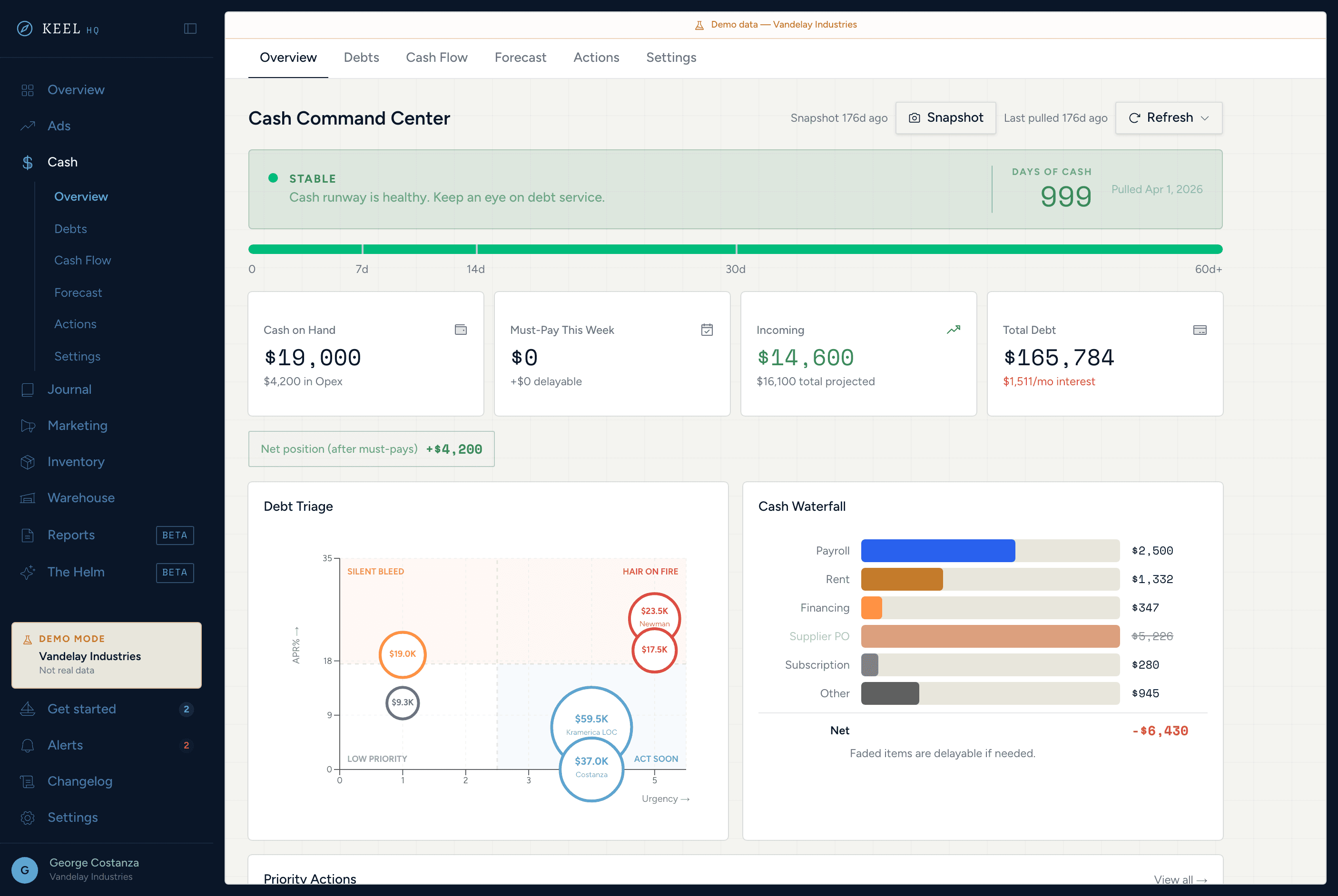
Runway days, debt stack, a 14-week rolling forecast with scenario sliders, and auto-generated action items — all without a spreadsheet.
See cash command center in Keel HQ
// related
- Free toolsFree 13-week cash flow forecast template for Shopify brandsDownload a free 13-week cash flow forecast for ecommerce as XLSX (Google Sheets or Excel) or CSV. Covers payout lag, fees, supplier POs, ad spend and a minimum cash flag.
- IntegrationsMercury cash flow forecast for Shopify brands with Keel HQConnect Mercury to Keel HQ with a read-only API token. Every active account syncs nightly or on demand into opening cash, runway and a 14-week forecast.
// sources
- Understanding Shopify Payments payout timing, Shopify Help Center · accessed